Search and AI Assistant in the Ozon Seller Center: How We Designed Them and What the Data Showed
We design Seller Center — a powerful tool for all Ozon sellers. Our interface covers every stage of selling on the marketplace: from seller registration to customer order logistics. Many different teams ship features every week. But it’s important to catch in time how product growth makes navigation more complex, to the point where users struggle to quickly figure things out and find what they need.
We spotted this through seller support requests. More than 20% of seller questions could have been solved through the interface — if only they’d known where to look. Our task became helping users quickly find the functionality they need for each request. In this article we share the internal workings of our core projects and talk about how, over 6 months, we added search and an AI assistant, and what the first data is already showing.
Where We Started
The product didn’t come to us as a ready-made spec, but with research data and a proposal to figure out how to solve the problem. That’s a good practice for large projects that affect the whole service. When design and product jointly formulate the task, the team develops a shared understanding of the goal. This approach set the tone for the entire project.
The request for search in the Seller Center had existed for a long time. In research, more than 60% of sellers said global search would help them work more efficiently, since navigation had grown to the point where it became hard to orient themselves. But when we looked at the tools already available in the Seller Center, we saw not one problem but two — two distinct behavior patterns, neither of which was addressed.
Pattern No. 1
The seller knows what they need but doesn’t know where to find it in the Seller Center. They click through the entire menu instead of getting on with their task.
Pattern No. 2
The seller opens the Seller Center and doesn’t know what they need at all. For example, sales dropped — but why? Are there growth opportunities? What changed this week? The seller could find the answers in the Seller Center, but only if they know where to look.
This is where we found the fork that shaped the whole project. The first pattern is directly about navigation and requires shortening the path from the start of a search to the result. But the second pattern isn’t about navigation at all. The seller has nothing to search for because they haven’t yet formulated a query. What they need is for the interface itself to show them what deserves attention.
Once we broke the user journey down into these patterns, we were able to define the core goals for each tool:
- Global search — for a formulated query.
- AI assistant — for an unformulated one.
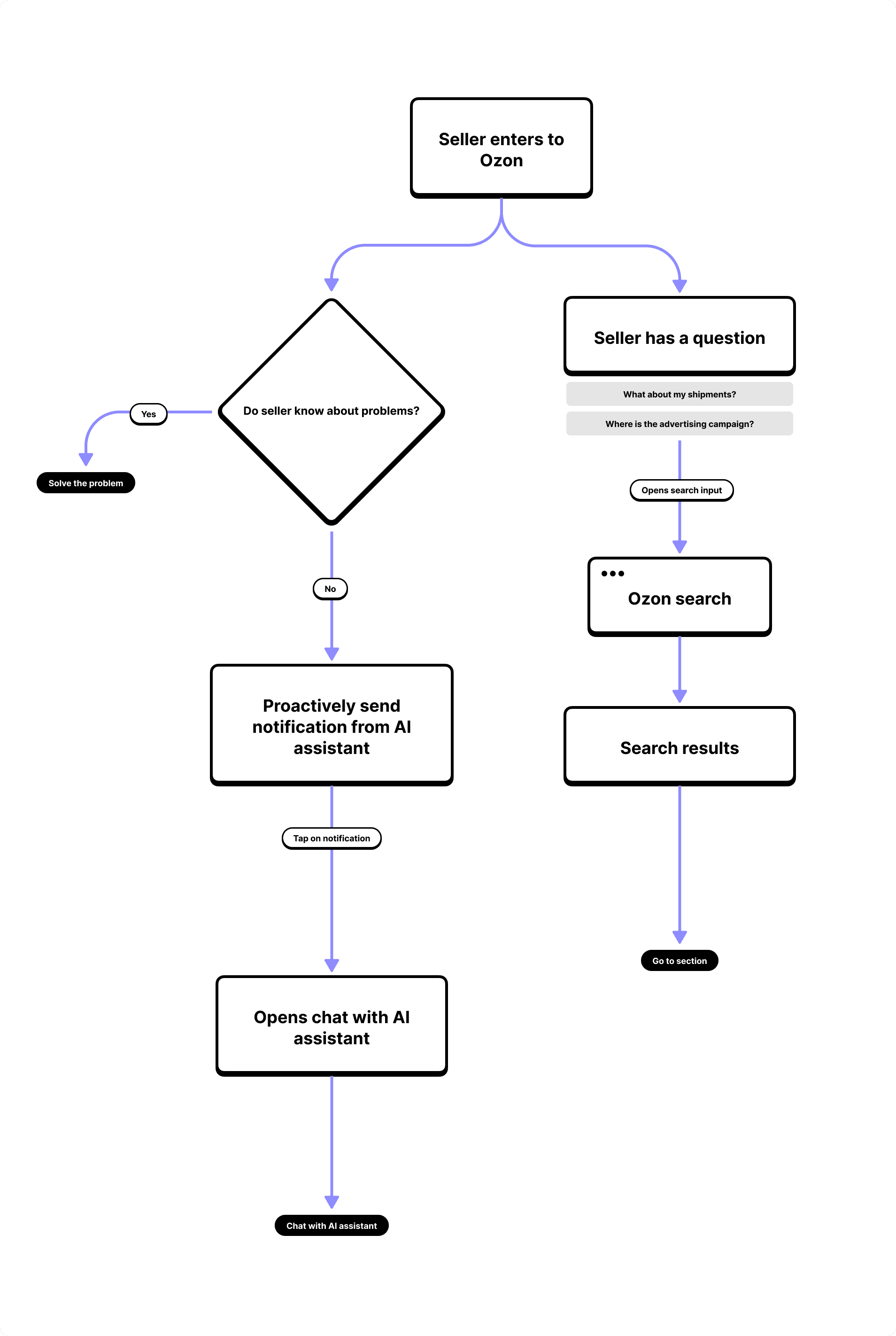
Search: Find What You Need in Seconds
The hypothesis was simple: if a seller quickly finds the section or function they need, they spend more time on their business and less time wandering the interface. Research data confirmed it — the audience had described the solution before we’d even started building it.
Next we had to figure out what sellers actually search for. They definitely need basic orientation across sections and tools in Seller Center, but they also need products, orders, settings, and quick actions.
Each result type follows its own logic, and we didn’t cut any of them for the sake of simplicity. On the contrary, we tailored each type to the specific data a seller needs to make a decision right in the results, without opening the section.
That’s how we moved from a broad concept trying to cover everything at once, to a focused MVP with clear priorities.
The key decision we landed on: search is visible from any page in the Seller Center and opens without extra steps. The seller shouldn’t have to search for where search is.
We also separately designed the state where search finds nothing. This isn’t an error to be hidden, but a full-fledged scenario: if there’s no precise answer in the Seller Center, search hands the seller off to the AI assistant. In the chat, they don’t need to phrase the query precisely — they can describe it in their own words. That’s how the two tools stopped being separate and merged into a single path.
AI Assistant: When Search Isn’t Enough
For a seller who doesn’t know what to search for, a search bar won’t help much. They need a tool that looks at their data itself and points out what deserves attention. We worked from an initial scenario map built by product managers on real context, analyzed patterns in support requests, looked at where sellers get stuck during onboarding, and identified what recurs in the questions experienced sellers ask.
AI Bubble: Just Whistle and It Appears
Besides answering questions, the assistant also needs to proactively start a dialogue when the system senses the user needs help. An interface that reaches out to the user first needs careful design, since it can easily turn into the kind of pop-up people close without reading.
The solution was the AI bubble — a floating message in the bottom-right corner of the screen. For newcomers, the bubble gives a contextual hint tied to the current page. For example, if a seller gets stuck on an onboarding step, the AI bubble suggests the question most commonly asked at that point.
For experienced sellers, it tracks the same set of metrics and appears when a value crosses a threshold built into the system. In other words, it shows not a random tip but a real change worth seeing right now.
During the design work, we carefully thought through the bubble’s timing — it should appear once the user has settled into the page but hasn’t yet left, without pressure and without aggressive delays.
What the Chat Can Do
We deliberately kept the chat surface simple so sellers wouldn’t need to figure out how to use it. Behind that simplicity are several scenarios, each of which required its own solution.
The seller can:
- Ask a specific question and get an answer with a link to the knowledge base — a source they can trust.
- Ask for a summary of yesterday’s metrics and get a detailed digest with targeted recommendations. The assistant analyzes the data itself and explains what changed and why.
- Continue the conversation with a follow-up question — the assistant keeps context across the whole dialogue. And when it’s unclear where to start, suggestions offer up the questions other sellers ask in similar situations.
We also separately designed the state where there’s no answer. This is a full scenario, not an error to hide: it’s important to honestly communicate the limitation and point to where to go next.
AI Guide for Designers
Alongside work on the assistant, we spotted another problem. AI components will eventually appear across different sections of the Seller Center, and if every team solves this on its own, we’ll end up with inconsistency in identity, tone, and state behavior. So we put together an internal AI guide for Seller Center designers. It includes principles for working with generative states, rules for formatting responses, and behavior during errors and uncertainty. The AI guide is a tool that lets different teams make consistent decisions independently of one another.
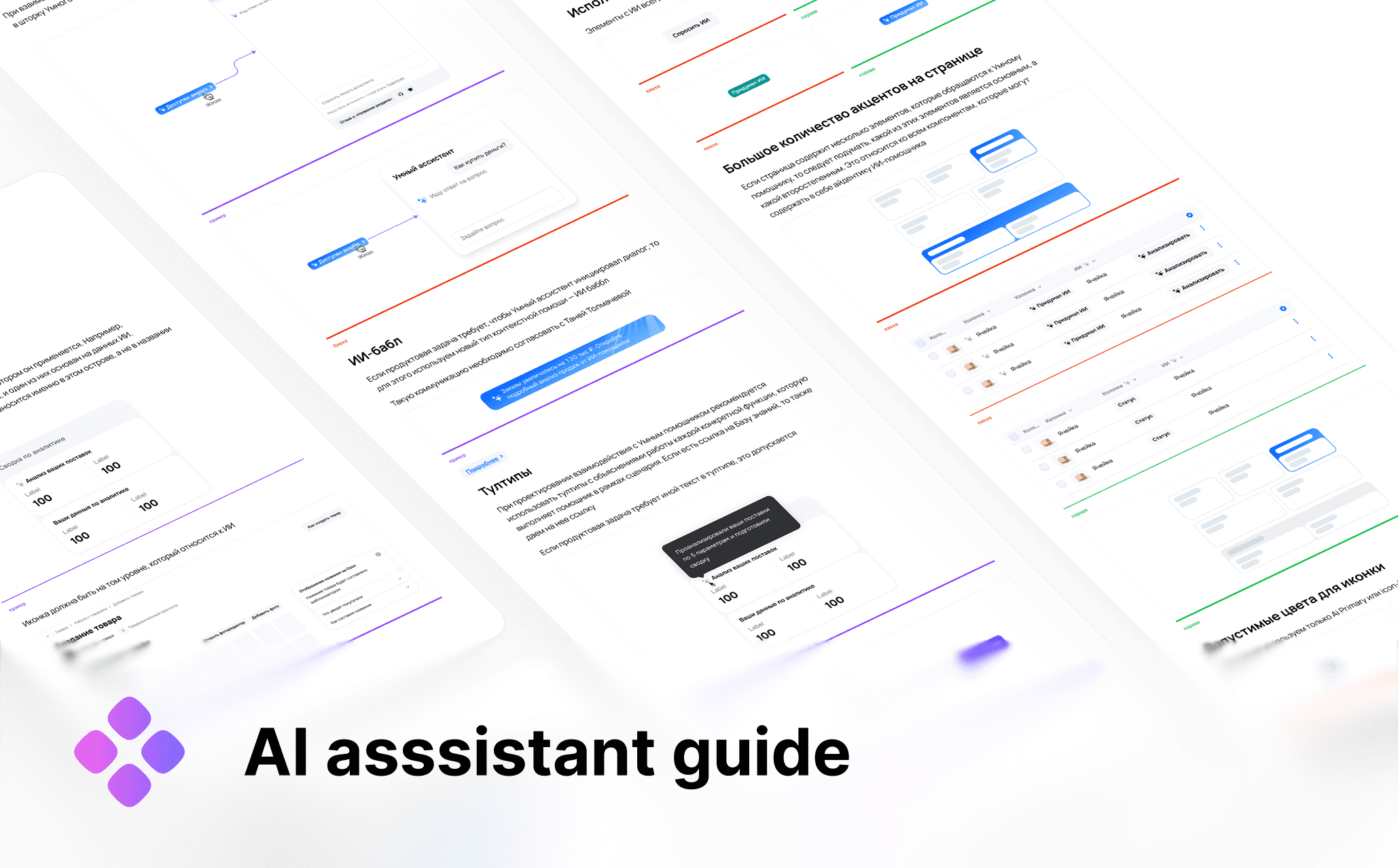
Smart Assistant
How We Worked
The project brought together more than eight teams with a shared deadline. Things caught fire periodically — an honest picture of cross-team work at this scale.
It helped that we got involved at the stage of formulating the task rather than receiving a finished spec. Design and product moved in the same direction from day one, which removed some of the final approval friction. We built synchronization deliberately: we made sure decisions didn’t diverge across teams and agreed on identity ahead of time.
In projects like this, the designer becomes the point of assembly — final specs and states need to work across several teams at once and resolve questions without extra meetings. Deadlines were tight, priorities shifted, we barely made the release date, and somehow we avoided fights with colleagues.
What the Data Showed After Launch
We rolled the product out in waves: from one test seller in mid-April to hundreds of thousands by the end of the month. This let us observe real behavior at every step and react in the moment.
By mid-May a stable pattern had formed. Sellers enter the assistant through three paths, and each one finds its own audience:
- the entry point through the menu captures the largest volume of traffic;
- the bubble brings in people who wouldn’t have opened the chat on their own;
- search creates a separate stream — around 1,800 users a day find the assistant specifically through it.
We tracked the conversion from clicking an entry point to sending the first query to the assistant separately. It shows whether the seller is actually turning to the assistant for help solving a problem, rather than just opening it to see what’s inside. The metric stabilized at 30–33%: every third seller who opens the chat immediately finds a reason to ask a question. The first days after rollout showed an expected dip to 21% amid rapid audience growth, after which the pattern settled.
For search itself, we looked at whether sellers find what they came for. About 63% of queries end with a click into the results — meaning search genuinely meets the need to quickly find the right section or piece of information. The very thing sellers used to go to support for.
What the Project Taught Us
Working on search and AI interfaces reminded us once again that we’re not designing screens — we’re designing user behavior. With search, we designed a system that gives the same answer every time; we can control the results. Working with the AI assistant is quite different, because it’s a system that answers differently each time. So the task becomes making the experience predictable exactly where that matters most: during waiting states, when there’s no answer, and in the first seconds after opening the chat.
We already knew how to design a controllable system; the Smart Assistant feature was designing a new type of system within Ozon Seller. Other projects will follow this one. It was cheaper for us to agree on the rules in advance than to reconcile discrepancies after the fact. The AI guide came from that same realization: new systemic decisions require systemic artifacts.
It also confirmed, in practice, the value of working with metrics — for us, post-launch data is a continuation of design work, not a separate story. We built launch-metric refinements into the same loop as the design itself. We’ll keep developing what’s already working for more than 100,000 users.
A large cross-functional team worked on this project: product managers, developers, ML engineers, analysts. Thanks to everyone who stayed in sync in “cried a little, but got it done” mode.